Introduction
The Fediverse has emerged as a decentralized alternative to mainstream social media platforms, aiming to return control over data, identity, and communication to its users. Instead of a single company operating a global network, the Fediverse is composed of many independent servers — commonly referred to as instances — that communicate with each other via open protocols such as ActivityPub. This architecture allows users on different instances to follow, interact with, and share content across server boundaries, forming a loosely connected but interoperable social network.
This concept of federation is central: each instance operates autonomously, with its own rules, moderation policies, and technical setup, yet remains part of the larger network. In practice, however, running such an instance is far from trivial. Administrators must handle not only deployment and maintenance, but also moderation challenges, storage requirements, and often significant bandwidth usage — especially when interacting with larger parts of the network. Additionally, smaller or newly created instances may struggle with limited reach unless they actively connect to relay servers or establish federated relationships.
At the same time, the underlying protocol does not prescribe a single implementation. Mastodon is only the most prominent example, but the Fediverse ecosystem supports a variety of alternative server software — each with different design goals and trade-offs.
One of these alternatives is GoToSocial, a lightweight ActivityPub server that takes a fundamentally different approach. Instead of targeting large, multi-user communities, it is designed primarily for single-user or small-scale deployments. This shift in focus addresses many of the operational and moderation challenges associated with traditional instances, while still maintaining compatibility with the broader Fediverse.
This article not only explains what GoToSocial is and how it differs from Mastodon, but also walks through the practical steps required to migrate from an existing Mastodon setup. Beyond deployment, we will look at how to retain connectivity within the Fediverse, how to compensate for limitations of single-user instances, and which tools can help restore discoverability and interaction.
What exactly is GoToSocial
GoToSocial is a lightweight, ActivityPub-compatible server implementation that deliberately focuses on a different use case than Mastodon. While Mastodon is designed as a multi-user platform with built-in moderation structures and a rich web interface, GoToSocial targets single-user or very small deployments where simplicity, control, and resource efficiency are the primary concerns.
A key design decision is its native compatibility with the Mastodon API. This allows users to continue using established mobile and desktop clients such as Tusky, Ivory, or Fedilab without modification. In practice, this means that switching to GoToSocial does not require abandoning familiar tooling — although not every edge feature of Mastodon clients is supported, the core interaction model (posting, following, timelines, media handling) works reliably.
From an operational perspective, GoToSocial is significantly less demanding. The service is implemented in Go, ships as a single binary, and can be deployed with minimal dependencies. Compared to a typical Mastodon stack — consisting of multiple services like PostgreSQL, Redis, Sidekiq, and a web frontend — the reduced complexity translates into lower memory usage, less maintenance overhead, and simpler upgrades. This makes it particularly attractive for self-hosting on small VPS instances or even low-power hardware.
Another important distinction lies in moderation. Because GoToSocial is not intended to host large communities, many of the typical moderation challenges simply do not arise. There is no need to manage user registrations, enforce community guidelines, or handle reports at scale. Instead, the instance effectively represents a single identity, shifting responsibility from community governance to personal curation — primarily through blocking, filtering, and selective federation.
Despite its minimalism, GoToSocial does not isolate its users from the broader Fediverse. It fully participates in ActivityPub federation, allowing interaction with Mastodon and other compatible platforms. At the same time, its lean design means that certain discovery and reach mechanisms — commonly present in larger instances — are less pronounced by default. This gap can be addressed through additional tools and extensions, which will be discussed in later sections.
GoToSocial Deployment
GoToSocial is designed with minimal operational overhead in mind, and this becomes particularly evident in its deployment model. Unlike Mastodon, which depends on a multi-service architecture, GoToSocial can run as a single container with an embedded SQLite database. This drastically reduces complexity and makes it well-suited for single-user environments or low-resource systems.
In this setup, persistence and configuration management become the central aspects to get right. Instead of relying on environment variables alone, GoToSocial can be fully configured via dedicated config.yaml, which improves transparency and makes versioning of configuration changes significantly easier.
Minimal Docker Compose setup with SQLite
A lean deployment can be achieved with a single service definition. The key aspect here is the persistent mounting of storage and configuration directories, as SQLite stores all state directly on disk.
services:
  gotosocial:
    image: superseriousbusiness/gotosocial:latest
    container_name: GTS
    user: 1026:100  # Run as non-root user for better isolation
    networks:
      - social
    ports:
      - "8424:8080"
    volumes:
      # Main configuration file (read-only)
      - /volume2/docker/social/gts/config/config.yaml:/gotosocial/config.yaml:ro
      # Persistent storage (includes SQLite database and media)
      - /volume2/docker/social/gts/data:/gotosocial/storage
      # Optional: custom themes and branding
      - /volume2/docker/social/gts/themes:/gotosocial/web/assets/themes
      - /volume2/docker/social/gts/assets/favicon.png:/gotosocial/web/assets/logo.png
      - /volume2/docker/social/gts/assets/favicon.png:/gotosocial/web/assets/logo.svg
      - /volume2/docker/social/gts/assets/favicon.png:/gotosocial/web/assets/logo.webp
    environment:
      - GTS_CONFIG_PATH=/gotosocial/config.yaml
    restart: always

networks:
  social:
    external: true
This setup intentionally avoids external dependencies. The SQLite database is stored at /gotosocial/storage/sqlite.db, which makes reliable backups as simple as snapshotting the mounted storage directory.
Configuration via config.yaml
Using a dedicated configuration file allows fine-grained control over instance behavior while keeping secrets and operational parameters centralized. A minimal but practical example could look like this:
# GoToSocial Configuration

# Basics
host: yourgotosocialdomain.ltd
protocol: https
forcing-https: true
port: 8080

# Database (SQLite)
db-type: sqlite
db-address: /gotosocial/storage/sqlite.db
db-sqlite-journal-mode: WAL          # Better concurrency and crash safety
db-sqlite-synchronous: NORMAL        # Balanced durability/performance
db-sqlite-cache-size: 2000
db-sqlite-busy-timeout: 5000

# Federation
federation-workers: 8
trusted-proxies:
  - 172.16.0.0/12
  - 192.168.0.0/16

# Instance Settings
instance-languages: en
instance-custom-css: /gotosocial/storage/custom.css
instance-inject-custom-css: true
instance-expose-public-timeline: true
instance-inject-federation-index: false
landing-page-user: user
accounts-registration-open: false     # Single-user mode
reports-allow-anonymous: false

# Media
media-remote-cache-days: 14
media-emoji-remote-cache-days: 30
media-video-max-size: 15MiB
redbridge-enabled: true

# Security
federation-spam-filter: true

# Mail (required for notifications and account management)
smtp-address: smtp.provider.ltd
smtp-port: 465
smtp-user: info@provider.ltd
smtp-password: "use_env_or_secret_here"
smtp-from: info@provider.ltd
smtp-verify-cert: true

# OIDC (optional, but useful for centralized auth)
oidc-enabled: true
oidc-idp-name: OIDC Provider
oidc-issuer: https://oidc.domain.ltd
oidc-client-id: gts
oidc-client-secret: "use_env_or_secret_here"
oidc-link-existing: true
oidc-scopes: openid,email,profile

# Storage
storage-backend: local
storage-local-base-path: /gotosocial/storage
A few practical considerations:
- Secrets: Avoid hardcoding sensitive values such as SMTP or OIDC credentials. Instead, inject them via environment variables or Docker secrets and reference them in the config.
- SQLite tuning: The chosen WAL mode and relaxed synchronous setting provide a good balance between durability and performance for low-traffic instances.
- Backups: Since database and media files share the same directory, consistent backups require either short downtime or filesystem-level snapshots.
- File permissions: Running the container as a non-root user (user: 1026:100) improves isolation but requires correct ownership on mounted directories.
Creating the initial user account
Unlike Mastodon, GoToSocial does not provide a guided onboarding flow via the web interface. Instead, the first user must be created manually via the command line. This can be confusing at first, especially since the instance will appear “empty” after initial startup.
To create the initial account, you need to execute the built-in admin command within the running container:
docker exec -it GTS /gotosocial/gotosocial admin account create \
  --username 'USERNAME' \
  --email 'EMAIL@DOMAIN.LTD' \
  --password 'YOUR_SECURE_PASSWORD'
Note: GTS is the container name in the example. Please adjust according to your setup.
Once the command completes successfully, the account is immediately active and can be used to log in via the web interface or any compatible Mastodon client.
From a security perspective, this approach has one advantage: user creation is not exposed via a public registration form, which aligns well with the single-user design of GoToSocial. At the same time, it requires direct system access, reinforcing the idea that this instance is fully under your control.
Customization and frontend adjustments
GoToSocial ships with a deliberately minimal web interface. It is not meant to compete with full-featured Mastodon frontends, but rather to provide a lightweight, functional surface for profile presentation and basic interaction. This design choice shifts the focus away from UI complexity and toward a stable, maintainable backend. Nevertheless, the system exposes several well-defined entry points for customization that allow you to tailor the appearance and behavior of your instance without modifying the underlying application.
The most straightforward mechanism is the injection of custom CSS. By referencing a stylesheet in the configuration file, the default frontend can be adjusted to reflect personal preferences or a consistent visual identity. This approach is intentionally simple: instead of maintaining a theming engine or recompiling assets, GoToSocial allows you to override styles at runtime.
instance-custom-css: /gotosocial/storage/custom.css
instance-inject-custom-css: true
A custom stylesheet placed within the persistent storage directory is automatically served by the application. This enables subtle adjustments — such as color schemes or typography — as well as more opinionated changes, for example hiding interface elements that are irrelevant in a single-user context. For more advanced theming examples and configuration details, the official GoToSocial documentation provides additional guidance.
Beyond styling, GoToSocial also allows direct replacement of static frontend assets. The container exposes a predictable directory structure for logos and icons, which can be overridden via bind mounts. This makes it possible to apply custom branding — such as replacing the default logo with a personal or project-specific variant — without maintaining a fork of the upstream project.
To achieve this, the relevant mount points can simply be added to the docker-compose.yaml, replacing the default assets with custom files:
- /volume2/docker/social/gts/assets/favicon.png:/gotosocial/web/assets/logo.png
- /volume2/docker/social/gts/assets/favicon.png:/gotosocial/web/assets/logo.svg
- /volume2/docker/social/gts/assets/favicon.png:/gotosocial/web/assets/logo.webp
This method is intentionally low-level but robust. It keeps the application itself immutable while still allowing visual customization. The only operational consideration is that upstream updates may introduce changes to asset paths or naming conventions, which should be verified during upgrades.
For more structured customization, GoToSocial supports additional theme directories. These can be mounted into the container and extend the default asset set with more comprehensive styling rules. While the ecosystem of prebuilt themes is still relatively small, this mechanism provides a clean separation between core assets and user-defined extensions, aligning well with long-term maintainability.
Despite its minimalism, GoToSocial integrates well into existing Fediverse workflows. Its compatibility with the Mastodon API ensures that clients, interaction patterns, and federation behavior remain largely familiar. However, for many users, the decisive question is not whether GoToSocial works — but whether switching is feasible without losing their existing social graph.
For users already running or actively using a Mastodon account, migration is therefore a critical aspect. While GoToSocial does not aim to replicate every feature of Mastodon, it provides enough interoperability to carry over essential data and preserve continuity within the Fediverse.
The following section focuses on exactly this process: what can be migrated, what cannot, and how to transition from a Mastodon-based setup to a GoToSocial instance with minimal disruption.
Migration Data from Mastodon to GoToSocial
Switching from Mastodon to GoToSocial is technically feasible, but it is not a full one-to-one migration. The underlying protocols allow for a certain level of portability — primarily around identity and social connections — but not all data can be transferred. Understanding these limitations upfront is essential to avoid false expectations and to plan a clean transition.
At its core, the migration process relies on Mastodon’s built-in export functionality. This allows users to extract key parts of their account data, which can then be imported into GoToSocial. The focus is on preserving your social graph rather than recreating a complete historical archive.
Exporting data from Mastodon
Mastodon provides a data export interface within the user settings. The most relevant exports for migration are:
- Following list
- Block list
- Mute list
These are typically provided as CSV files and can be downloaded directly from the web interface. Additionally, Mastodon allows exporting an archive of posts and media, but this serves more as a personal backup than something that can be re-imported into another platform.
Before proceeding, it is advisable to clean up the following list—removing inactive or unwanted accounts reduces noise after migration and speeds up the initial federation process.
Importing into GoToSocial
GoToSocial supports importing account relationships via its Mastodon-compatible API. Most clients that support Mastodon account management can be used for this step, or alternatively, the import can be performed via the GoToSocial web interface if enabled.
The typical workflow involves:
- Creating the new GoToSocial account
- Uploading the exported CSV files
- Letting the instance process and re-establish connections
Once imported, GoToSocial begins to federate with the referenced accounts. Depending on instance size and federation activity, it may take some time until timelines start to populate again.
What cannot be migrated
A critical limitation is that posts (toots), favorites, boosts, and media attachments cannot be imported into GoToSocial in a meaningful way. This is not a restriction specific to GoToSocial, but rather a consequence of how ActivityPub and Mastodon handle content ownership and distribution.
In practice, this means:
- Your posting history will not appear on the new instance
- Previously uploaded media is not transferred
- Engagement data (likes, boosts) is lost
If preserving historical content is important, maintaining the original Mastodon account in a read-only state is often the most practical approach.
Redirecting your identity
Mastodon offers a mechanism to redirect followers to a new account. This can be used to inform your network about the move and retain visibility.
The process typically involves:
- Setting the GoToSocial account as the new destination
- Enabling account redirection in Mastodon
- Optionally posting a final message announcing the migration
This step is particularly important because not all followers will automatically reappear through list imports alone. Federation is not a centralized system, and discovery depends heavily on prior interactions.
Managing expectations and continuity
After migration, your new GoToSocial instance effectively starts as a “cold” node in the network. Even with imported follows, timelines may initially feel sparse. This is expected behavior and improves over time as federation catches up and new interactions occur.
From a practical perspective, the migration should be seen less as a seamless transfer and more as a controlled reset: your identity and connections persist, but your content history does not. In return, you gain a significantly leaner, more controllable environment with reduced operational overhead.
In the next section, we will address one of the key challenges that arises from this model — discoverability — and explore how tools like GTS Federator can help reconnect your instance to the wider Fediverse.
How to find other instances and people (GTS Federator)
One of the less obvious challenges when running a single-user GoToSocial instance is discoverability. While federation via ActivityPub works reliably on a technical level, it is largely interaction-driven. In contrast to large Mastodon instances, which benefit from a constant stream of incoming federation traffic, smaller or isolated instances often start with sparse timelines and limited exposure.
This is not a flaw in GoToSocial itself, but a consequence of its design philosophy. Without active subscriptions, relays, or existing network effects, your instance simply has fewer opportunities to “discover” content and remote actors. In practice, this often results in the well-known “empty timeline” problem — especially after a fresh migration.
A common solution in the Mastodon ecosystem is the use of relay servers. However, relays tend to operate on a broadcast model, effectively subscribing you to a high-volume, unfiltered stream of content. For single-user instances or resource-constrained environments, this approach is often inefficient and difficult to control.
This is where GTS Federator comes into play.
From HolMirDas to GTS Federator
GTS Federator is a targeted discovery engine designed specifically for GoToSocial. Instead of passively receiving large amounts of federated traffic, it follows a pull-based approach: you define what you are interested in, and the system selectively fetches relevant content.
Technically, the tool is based on the concept introduced by earlier projects such as HolMirDas, which pioneered RSS-based federation. Building on this idea, GTS Federator was forked and significantly extended to better fit modern deployment scenarios and the specific requirements of GoToSocial.
The result is not just a simple script, but a production-ready service that integrates cleanly into containerized environments and focuses on stability, efficiency, and maintainability.
The core idea: controlled federation via RSS
Instead of subscribing to entire instances, GTS Federator monitors a configurable set of RSS feeds. These can originate from:
- Mastodon hashtag timelines
- User profiles
- curated feeds from larger instances
For each new entry discovered in these feeds, the tool triggers your GoToSocial instance to fetch the corresponding post via its API. This process effectively “introduces” new content and remote accounts to your instance, allowing them to appear in your timelines and become part of your local federation graph.
This model has several practical advantages. It gives you fine-grained control over which content enters your instance, avoids unnecessary bandwidth consumption, and prevents the uncontrolled growth typically associated with relay usage. At the same time, it remains fully compatible with the Fediverse, since all interactions still happen via standard ActivityPub mechanisms.
Improvements in this fork
Compared to the original implementations, GTS Federator has been substantially reworked to behave like a proper long-running service rather than a collection of scripts. The fork introduces an internal scheduling mechanism, removing the dependency on external cron jobs and making it a natural fit for Docker-based deployments.
In addition, request handling has been optimized to avoid overloading both your own instance and remote servers. Instead of issuing bursts of API calls, the system sequences requests with configurable delays, which results in more predictable and stable behavior.
State management has also been improved. Rather than relying on simple URL tracking, the tool maintains a persistent JSON-based database that survives restarts and keeps track of already processed content. This not only prevents duplicate federation but also provides basic insights into instance growth over time.
Finally, the entire application follows a “security-first” container design. It runs as a non-root service, keeps configuration fully externalized via environment variables, and limits its communication strictly to your GoToSocial instance and the RSS sources you explicitly define.
Positioning within your setup
GTS Federator is best understood as a complementary component rather than a core service. GoToSocial handles federation and identity, while GTS Federator enhances discoverability and content flow. Together, they form a controlled and resource-efficient alternative to traditional Mastodon setups.
In the next step, we will look at how to deploy GTS Federator and connect it to your GoToSocial instance.
Deploying GTS Federator and connecting it to GoToSocial
In order for GTS Federator to interact with your GoToSocial instance, it requires API-level access. This is achieved by registering a dedicated application within GoToSocial and generating an access token with the appropriate scopes. This step is essential, as the federator uses this token to trigger content fetching and federation on your behalf.
Registering an application in GoToSocial
GoToSocial exposes an application management interface similar to Mastodon. Within the settings panel, you can create a new application that is allowed to access the API.
The relevant section can be found under Settings → Applications. After creating a new application, you will be presented with the following overview:
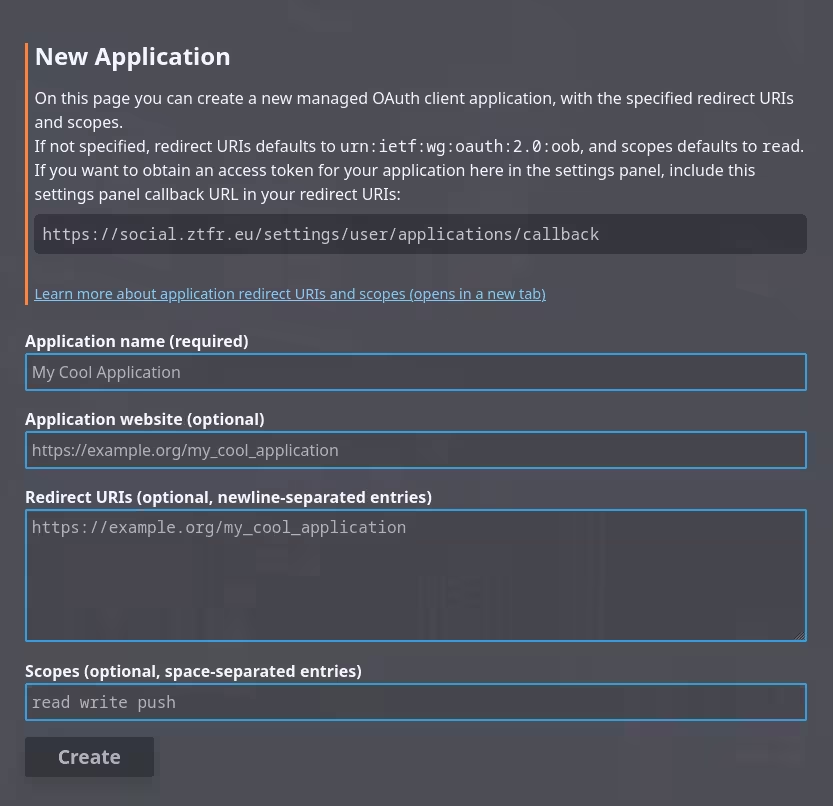
Its important to copy the callback url into the redirect url field and to add read, read:search and read:statuses to the scopes section. Only then the application will have the necessary rights to work properly.
Using the “Request access token” flow, you authorize the application against your own account. This results in an access token, which is later used by GTS Federator as its authentication mechanism.
From a security perspective, this token should be treated like a password. It grants API access to your account and should therefore never be exposed publicly or committed into version control.
Containerized deployment
Once the API credentials are available, deploying GTS Federator follows the same lightweight approach as GoToSocial itself. The service runs as a standalone container and does not require additional infrastructure.
A minimal docker-compose.yaml service definition could look like this:
federation:
  image: domoel/gts-federator:latest
  container_name: GTS-Federator
  user: 1026:100

  volumes:
    # Persistent state (processed posts, cache)
    - /volume2/docker/social/federation/data:/app/data
    # RSS feed configuration (read-only)
    - /volume2/docker/social/federation/rss_feeds.txt:/app/rss_feeds.txt:ro
  networks:
    - social
  restart: always
  environment:
    - TZ=Europe/Berlin
  env_file:
    - /volume2/docker/social/federation/.env

networks:
   social:
      external: true
The structure closely mirrors the GoToSocial deployment: configuration and state are externalized via mounted volumes, while runtime parameters are defined through environment variables.
Configuration via .env
All relevant parameters for GTS Federator are defined in a .env file. This keeps sensitive information — especially the access token — separate from the compose file and allows for easier adjustments.
# Basics
GTS_SERVER_URL=https://yourgotosocialdomain.ltd
GTS_ACCESS_TOKEN=YOUR_APPLICATION_ACCESS_TOKEN

# Performance tuning
MAX_POSTS_PER_RUN=25
DELAY_BETWEEN_REQUESTS=1
FETCH_INTERVAL=30m
REQUEST_TIMEOUT=30
LOG_LEVEL=INFO

# Bot identity
USER_AGENT=GTS-Federation-Bot/1.0

# Paths (usually unchanged)
RSS_URLS_FILE=/app/rss_feeds.txt
DATABASE_PATH=/app/data/processed_urls.json
The most critical parameters are the instance URL and the access token. Together, they define where the federator operates and how it authenticates.
The remaining settings primarily influence behavior and performance. For example, FETCH_INTERVAL controls how often new content is discovered, while DELAY_BETWEEN_REQUESTS helps prevent excessive load or rate limiting — both locally and on remote instances.
Defining content sources via RSS
The actual discovery logic is driven by a simple text file containing RSS feed URLs. These feeds define what kind of content should be pulled into your instance.
A typical rss_feeds.txt might look like this:
# RSS Feed Templates
# https://[instance]/users/[account].rss?limit=25
# https://[instance]/tags/[topic].rss?limit=25

# Tech & Homelab
https://fosstodon.org/tags/homelab.rss?limit=25
https://fosstodon.org/tags/docker.rss?limit=25
https://fosstodon.org/tags/matrix.rss?limit=25
https://fosstodon.org/tags/linux.rss?limit=25
https://fosstodon.org/tags/foss.rss?limit=25

# Privacy & Security
https://infosec.exchange/tags/security.rss?limit=25
https://infosec.exchange/tags/privacy.rss?limit=25
https://infosec.exchange/tags/gdpr.rss?limit=25
https://infosec.exchange/tags/cybersecurity.rss?limit=25

# Science & Education
https://mastodon.social/tags/wisskomm.rss?limit=25
https://chaos.social/tags/forschung.rss?limit=25
Feeds can point to hashtags, individual user profiles, or curated timelines. This gives you precise control over which topics and communities are reflected in your local timeline — without relying on high-volume relays.
Operational considerations
Once started, GTS Federator runs autonomously in the background. It periodically checks all configured feeds, processes new entries, and triggers federation through your GoToSocial instance. Over time, this leads to a gradual expansion of your local dataset and a noticeably richer timeline experience.
From an operational standpoint, the service is intentionally low-maintenance. Logs provide visibility into activity and growth, while the internal state tracking ensures that content is not processed multiple times. Combined with conservative rate limiting, this makes the setup suitable even for low-power environments.
With this component in place, a single-user GoToSocial instance gains a controlled and scalable mechanism for discovery — effectively bridging the gap between isolation and the broader Fediverse.
Optional: Using an own Frontend (Elk)
While GoToSocial provides a functional web interface, it is intentionally minimal. This becomes noticeable quite quickly for users coming from Mastodon, where the web UI plays a central role in daily interaction. In contrast, GoToSocial treats the frontend as a secondary concern. Its primary goal is to provide a stable and efficient backend, leaving the choice of user interface largely open.
For users who rely heavily on the browser rather than mobile clients, this minimalism can feel restrictive. This is where external frontends such as Elk become relevant.
Elk is a modern, lightweight web interface built for Mastodon-compatible backends. Because GoToSocial implements the Mastodon API, it can be used with Elk without any modifications. In practice, this means you can retain the lean backend architecture of GoToSocial while regaining a more feature-rich and responsive user experience in the browser.
Deploying Elk follows the same pattern as the rest of the setup: it runs as a standalone service and connects to your existing GoToSocial instance. Once available, you simply log in using your GoToSocial credentials, and Elk handles all interaction via the API. There is no need for additional plugins or backend changes.
elk:
    image: ghcr.io/elk-zone/elk:latest
    container_name: Elk
    user: 1026:100
    volumes:
      - /volume2/docker/social/elk/data:/elk/data
    environment:
      - NUXT_PUBLIC_DEFAULT_SERVER=https://yourgotosocialdomain.ltd
      - NUXT_PUBLIC_SINGLE_INSTANCE=true
      - HOST=0.0.0.0
      - PORT=3000
      - NODE_ENV=production
    networks:
      - social
    ports:
      - "3333:3000"
    deploy:
      resources:
        limits:
          memory: 512M
    restart: always

networks:
  social:
    external: true
What makes this approach particularly appealing is the clear separation of concerns. GoToSocial remains a focused, low-maintenance federation backend, while Elk provides a modern interface layer on top. This not only improves usability, but also keeps the overall system modular. If needed, the frontend can be replaced or updated independently of the core service.
There are, however, a few practical considerations. Introducing Elk adds another component to your stack, which means additional updates and basic operational overhead. Moreover, since GoToSocial does not implement every Mastodon feature, certain interface elements in Elk may not behave exactly as expected. In everyday use, though, these differences are usually minor and do not impact the core experience.
In setups where mobile or desktop clients are the primary interface, running a separate frontend may not be necessary at all. But for users who prefer working in the browser, Elk provides a compelling way to close the gap between GoToSocial’s minimalism and the richer experience offered by traditional Mastodon instances—without sacrificing the efficiency and control that motivated the switch in the first place.
Conclusion
Running your own presence in the Fediverse does not have to mean operating a full-scale Mastodon instance. As this guide has shown, GoToSocial offers a fundamentally different approach — one that prioritizes simplicity, efficiency, and individual control over community-scale features.
By reducing the system to its essentials, GoToSocial lowers the barrier to self-hosting significantly. The combination of a single-service architecture, SQLite backend, and minimal frontend makes it feasible to run a fully federated identity even on low-power hardware. At the same time, compatibility with the Mastodon API ensures that this lean setup does not come at the cost of usability. Existing clients, workflows, and interaction patterns remain largely intact.
However, this shift also requires a different mindset. Instead of relying on built-in discovery mechanisms or large instance dynamics, you actively shape your experience. Tools like GTS Federator demonstrate how this can be done in a controlled and resource-efficient way, replacing the “firehose” model of relays with a curated, pull-based approach. Similarly, optional components like Elk allow you to selectively reintroduce convenience features without compromising the overall architecture.
The migration from Mastodon to GoToSocial reflects this trade-off clearly. While not all data can be preserved, the essential parts — identity and social connections — remain portable. What you gain in return is a setup that is easier to maintain, more predictable in resource usage, and significantly more aligned with privacy-conscious operation.
In the end, GoToSocial is not a drop-in replacement for Mastodon, but an alternative interpretation of what participating in the Fediverse can look like. For users who value control over convenience, and clarity over complexity, it provides a compelling foundation for a self-hosted, single-user social presence.



@zeitfresser maybe I should add a another post regarding wordpress and activity pub because I just recently found out that a wordpress blog can also act as an independent activity pub server.
Remote Reply
Original Comment URL
Your Profile
Why do I need to enter my profile?
This site is part of the ⁂ open social web, a network of interconnected social platforms (like Mastodon, Pixelfed, Friendica, and others). Unlike centralized social media, your account lives on a platform of your choice, and you can interact with people across different platforms.
By entering your profile, we can send you to your account where you can complete this action.